Networking and Security
Untangle Firewall : Best Opensource Choice
By Amjid Ali · · Updated · 2 min read

In this article
Opensource software are free of charge, this blog is about the Open source network appliance which is very popular in Small, Medium size and large companies as well as educational institutes.
Many Other opensource software are there but I have found this one the best software firewall.
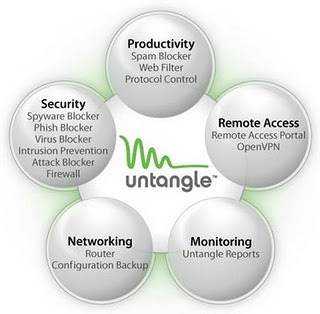
Yes! , really it has helped me in Web Filtering, Malware (Virus, Spyware, spam) Blocking, email scanning, attack blocking it has built in IDS.
Not just this using this I have established Virtual Private Network (VPN) across all the locations using OPENVPN, which is again open source.
So Imagine one box contains everything.
What is Untangle?
Untngle is a powerful suite of internet/network management application for small to medium businesses, education institutes and other organizations.
it is a Multi Function-Firewall and a security product which suits the business needs of todays internet world. it is simple to use and easy to implement.
Why Untangle Firewall
I have been using ISA Server for past 7 years. But it was not fulfilling my requirements and it was expensive too. I wanted to to for a box which must be all in one, but here was again issue of priing.
Luckily I looked for opensource, which helped me to use my existing extra computer (Desktop PC) and use this as firewall.
I looked for many Opensource Firewall devices and applications but I found untangle had all the options and best.
I started using Untangle in 2007, and and I didn’t face any issue in past 3 year. I thought sharing my experience would help many.
It didn’t cost me anything because , I used extra PC with an additional LAN and started the Installation.
Untangle Firewall Installation
For Installing this application you just need to download ISO. Downloaded Untangle 7.4 now there must be new. So download latest Image.
- Your PC must have at least 2 Network Cards (one for WAN and another for LAN)
- My PC had the Hardware configuration (HP DX2300, 3.0Ghz, 2GB RAM, 120GB HD)
- Install the Untangle Software from ISO Image/CD
- Boot the system .
- Once the system it installed you will be able to see web user interface.
- Just on few easy steps for basic confirmation your firewall will be ready.
- Lite package is free which does most of the jobs.
Similarly I had extra computers, so Instead of wasting them I installed Untangle in all the systems.
Installed in 12 branches/offices and created the Virtual Private network in easy steps.
Firewall policy is replicated across all the locations.
Untangle Fierwall Packages
Untangle has some free applications and some paid applications but free applications are even enough for small and medium organizations.
Version 8.0 has bandwidth control options available, which is really an amazing feature .The package list contains, Premium, Standard, Education Standard, Education Preimum, and Lite Package, Lite Package is off course free.
Untangle Firewall Step by Step Installation
Please click here to see the User Guide and all tutorials of Untangle Server 8.0
Frequently asked questions
What is the best free open source NGFW?+
The best free open source NGFW depends on your needs: OPNsense for advanced security features and regular updates, pfSense for maximum flexibility and community support, or Arista NG (Untangle) for ease of use. OPNsense ranks #1 for most users due to its built-in NGFW features including intrusion prevention, web filtering, and multi-WAN support — all completely free.
Is pfSense a next generation firewall?+
pfSense is not an NGFW by default — it is a traditional stateful firewall and router. However, with add-ons like Suricata (IDS/IPS), Squid (web proxy), and Snort, it can function as a next generation firewall. For native NGFW features out of the box, OPNsense or Arista NG are better choices.
What is the difference between UTM and NGFW?+
UTM (Unified Threat Management) combines multiple security features (firewall, antivirus, content filtering, VPN) into a single solution, ideal for small to medium businesses. NGFW (Next Generation Firewall) focuses on deep packet inspection, application-level filtering, and intrusion prevention with more granular control. Modern firewalls often blur the line between UTM and NGFW.
Can I use an open source firewall for my home network?+
Yes, open source firewalls like OPNsense and pfSense are excellent for home networks. They run on low-cost hardware (even old PCs or mini PCs), provide enterprise-grade security, and cost nothing for the software. For home use, Arista NG (Untangle) is the easiest to set up, while OPNsense offers the most advanced free features.
Which open source firewall is easiest to use?+
Arista NG (formerly Untangle) is the easiest open source firewall to use. It features a simplified web-based UI, wizard-driven setup, and pluggable apps that can be enabled with one click. Most aspects can be configured through GUI without command-line knowledge. OPNsense is moderately easy, while pfSense requires more technical expertise.
Are free NGFW firewalls as good as paid ones?+
Free open source NGFW firewalls like OPNsense and pfSense offer enterprise-grade features that rival paid solutions like Palo Alto or Fortinet for most use cases. The main differences are: paid firewalls offer centralized management, premium threat intelligence feeds, dedicated vendor support, and advanced features like SSL inspection at scale. For home labs, small businesses, and even mid-size deployments, free open source NGFWs are more than sufficient.
Keep reading
 Networking and SecurityUntangle Installation Guide: Step by Step guide for NG FirewallThis is step by step Installation Guide of Untangle, Untangle is a Multi Function firewall, to know more about Untangle Click here, you can create... · 2 min read
 Networking and SecuritypfSense vs OPNsense (2026): Which Open Source Firewall to ChoosepfSense vs OPNsense in 2026: OPNsense ships fully open, frequent releases; pfSense CE stays free and Plus fits Netgate hardware. Here is which to choose. · 11 min read
 Networking and SecurityFortinet: Your Shield Against the Evolving Cyber Threat LandscapeIn an era where digital transformation is reshaping industries, the specter of cyber threats looms larger than ever. Businesses of all sizes are increas... · 3 min read