Networking and Security
Pi-hole DNS Server Installation Guide on Raspian and Ubuntu
By Amjid Ali · · Updated · 2 min read
In this article
Prefer to watch? This video walks through it step by step. Prefer to read? The full guide is below.
Pi-Hole is a Network Wide protection system that helps to block the ads and improves network performance.
You can see the statistics using the web interface.
Step by Step Tutorial of Pi-Hole Installation
Setting up Pi-hole is very simple. inThis guide will help you to install Pi-Hole on any device. Look at the specific section to install Pi-hole on your device.
Pi-Hole on Raspberry PI
The Raspberry Pi is one of the most popular single-board computers. For learning various technologies especially in schools. Raspberry PI for Children is considered as a must tool these days.
But you can use this for various experiments too.
I have been using Raspberry Pi at my Home Lab for many years. Bet it installing Windows 10 or any other operating Sytem.
Installing Pihole on Raspberry pi is very simple. Just follow below steps to install on Raspberry Pi, (Pi3, Pi4 or PiZero)
- To get ready you first need to isntall Install Raspbian and to Install you can follow Raspberry Pi Guide
- Boot the Raspberry pi and login to the Terminal with Default user ID : pi and password : raspberry
- Configure Raspberry PI by using below command
raspi-config
- Assign the Static IP Address to Ubuntu Server by going into the configuration as below
sudo nano /etc/dhcpcd.conf
- Finally Install Pi-Hole using below command
curl -sSL <https://install.pi-hole.net> | bash
Pi-Hole on Ubuntu Server
Once you install Ubuntu Server just use the below command to quickly install the pihole.
curl -sSL https://install.pi-hole.net | bash
Pi-Hole on Docker
How to Upgrade PiHole
Simply check which version is available and which version is latest. You can run below command to check the pihole version.
pihole version
If an update is available now you might run the below command
pihole -up
alternatively, you can also use the below command to update pihole.
pihole updatePihole
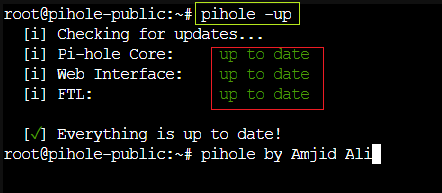
Once you run the command again
pihole version
You will get below output which means that pihole is up to date.
Related videos
Video library- Networking and Security
Pi-hole Ads Blocker // Full Review and Install on Raspberry and Ubuntu
· 8:07 · 1.3K views
Watch on YouTube - Networking and Security
Ad Blocking Setup: Pi-hole on Docker with pfSense Integration | Stop Ads Network-wide!
· 6:21 · 1.8K views
Watch on YouTube
Keep reading
 Networking and SecurityThe Ultimate Guide to pfBlockerNG Recommended Feeds in 2025Discover the best pfBlockerNG feeds for 2025, including ad blocking, DNSBL, and recommended lists for enhanced network security and performance. Perfect for pfSense setups! · 3 min read
 Networking and SecurityStep-by-Step Guide to Installing Wazuh on Ubuntu Server 24.04Wazuh is a powerful, open-source security platform for monitoring and threat detection. In this guide, we will walk you through the installation process... · 2 min read
 Networking and SecurityHow to Secure Your External Drive with Password ProtectionLearn how to enhance your data security with step-by-step instructions on password protecting your external drive using BitLocker encryption. Whether you're on Windows 11 Professional or moving data across platforms, this guide ensures your information stays secure. Subscribe now for more tech tutorials and stay informed! · 1 min read